
Content calendars often look deceptively simple: a few dates, content ideas, and publishing channels arranged in a spreadsheet.
In practice, the right calendar needs to do much more. It should help your team coordinate deadlines, balance content formats, assign ownership, manage approvals, and connect every planned asset to a broader campaign or marketing goal.
That is where many templates fall short.
A calendar designed for a solo blogger may not support a social team publishing across five platforms. Likewise, an enterprise workflow packed with approval stages and dependencies may be unnecessarily complicated for a small marketing team.
As such, the best content calendar is not necessarily the most detailed or visually impressive but the one that reflects how your team actually plans, produces, approves, and publishes content.
In this guide, we will explore practical content calendar examples for social media, blogs, email, campaigns, product launches, and multi-channel marketing. You will also learn how to compare calendar formats, choose the right structure, and customize it around your workflow.
To make implementation easier, you can download one of our free Google Sheets templates and adapt it as you work through the examples.
📥 Choose Your Free Content Calendar Template
Different workflows require different calendars.
Planning social posts and campaigns? Use the IMH Social Media Calendar Template to organize platforms, publishing dates, post formats, campaign details, copy, assets, and status updates.
Managing articles, SEO content, or editorial production? Use the IMH Editorial Calendar Template to track topics, target keywords, writers, deadlines, workflow stages, and publication dates.
- What Is a Content Calendar?
- Content Calendar Types at a Glance
- How to Choose the Right Content Calendar
- Benefits of Using A Content Calendar
- Social Media Content Calendar Example
- 2. Blog Editorial Calendar Example
- 3. Multi-Channel Marketing Calendar Example
- 4. Email Marketing Calendar Example
- 5. Campaign Content Calendar Example
- 6. Weekly Content Calendar Example
- 7. Monthly Content Calendar Example
- 8. Kanban Content Calendar Example
- 9. Annual Editorial Calendar Example
- Build a Content Calendar That Supports the Work
- Frequently Asked Questions
What Is a Content Calendar?
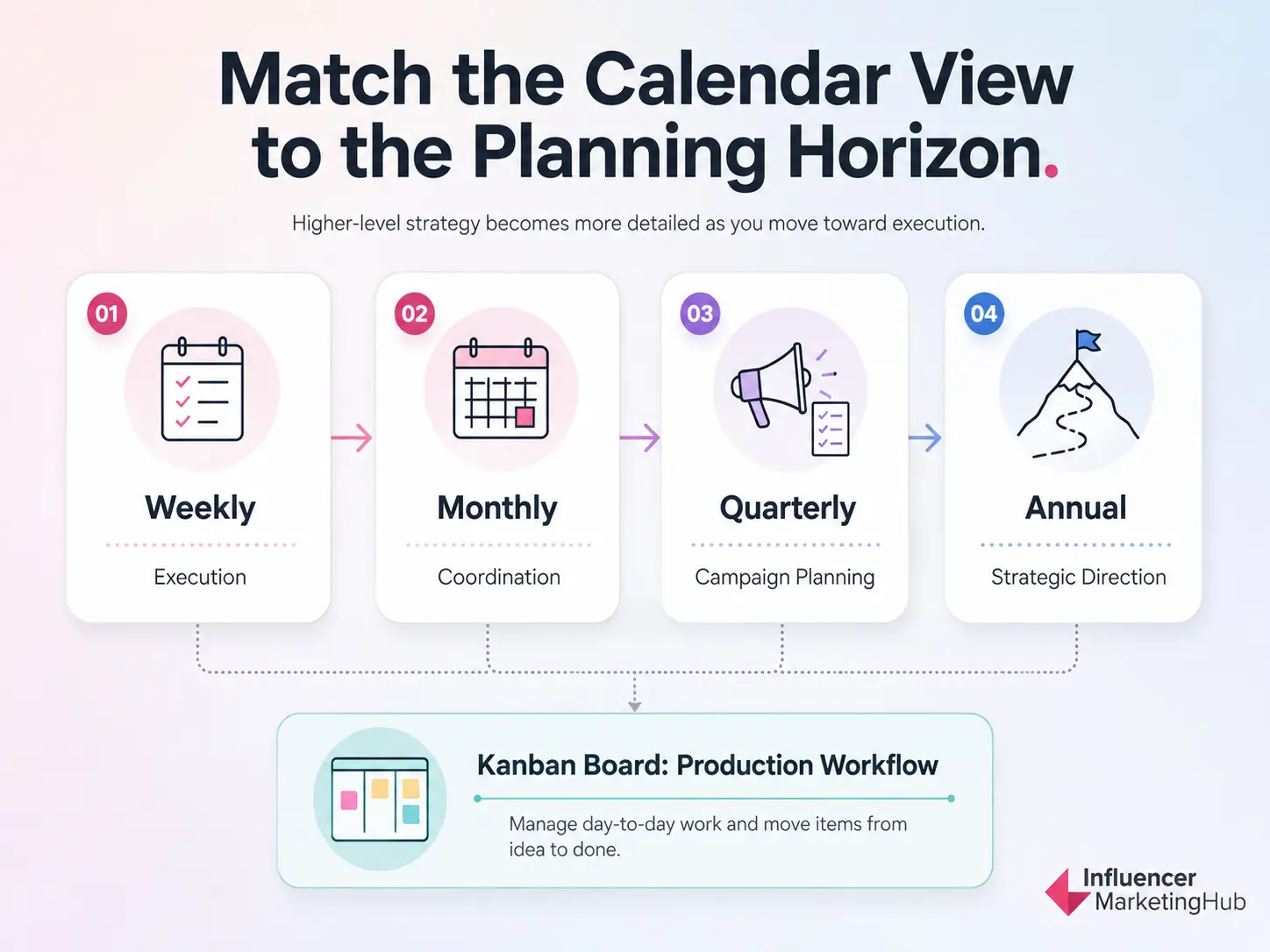
A content calendar is a planning and production system that documents what your team intends to publish, where it will appear, when it is due, and who is responsible for delivering it. Essentially, it is a document that looks at your entire content planning structure.
The necessity of a content calendar is evident by the fact that 64% of marketers and business owners invest in content strategies.
It may take the form of a spreadsheet, monthly grid, weekly schedule, Kanban board, annual roadmap, or a calendar built into a content management platform.
Regardless of its format, an effective content calendar should give your team a clear view of:
- Upcoming content
- Publishing channels
- Production deadlines
- Assigned owners
- Workflow status
- Campaign alignment
- Supporting drafts and assets
A basic calendar might only record publication dates and topics. A more advanced version can coordinate writers, designers, editors, social media managers, campaign leads, and approvers across several channels.
The right level of detail depends on the complexity of your content operation.
Content Calendar vs. Editorial Calendar
Content calendars and editorial calendars are closely related, but they do not always serve the same purpose.
| Calendar | Primary Purpose | Commonly Tracks |
| Content calendar | Coordinates content across one or more marketing channels | Channel, format, campaign, date, owner, status |
| Editorial calendar | Manages the planning and production of published editorial content | Topic, keyword, author, editor, deadlines, publication date |
| Social media calendar | Organizes social posts across platforms | Platform, post copy, asset, publishing time, campaign |
| Marketing calendar | Coordinates broader campaigns and promotional activity | Campaigns, email, social, paid media, events, landing pages |
An editorial calendar may sit inside a broader content calendar. For example, a marketing team might use one master calendar to coordinate campaigns while maintaining a more detailed editorial sheet for blog production.
What Should a Content Calendar Include?
The fields you include should help your team make decisions and move content through production. Adding more columns does not automatically make a calendar more useful.
Most effective content calendars include the following information:
| Field | Purpose |
| Topic or title | Identifies the planned content |
| Channel | Shows where the content will be published |
| Content format | Defines whether the asset is an article, video, email, carousel, or another format |
| Campaign or goal | Connects the content to a strategic objective |
| Content pillar | Helps maintain a balanced topic mix |
| Owner | Establishes responsibility for delivery |
| Due date | Controls production timing |
| Publish date | Maintains the publishing schedule |
| Status | Shows whether the content is planned, in production, under review, or published |
| Draft or asset link | Centralizes working files and creative materials |
| CTA | Clarifies the action the audience should take |
| Performance notes | Records results and lessons for future planning |
Not every calendar needs every field. A solo creator might only need the topic, format, channel, and publishing date. A larger team may also need separate deadlines for briefing, drafting, design, editing, approval, and scheduling.
Content Calendar Types at a Glance
Content calendar examples are most useful when they reflect a specific workflow. Before examining each one in detail, use this comparison to identify the formats most relevant to your team.
| Content Calendar Example | Best For | Recommended Format |
| Social media content calendar | Planning posts across several platforms | Spreadsheet or weekly grid |
| Blog editorial calendar | Managing articles, SEO content, and editorial workflows | Spreadsheet |
| Multi-channel marketing calendar | Coordinating campaigns across content channels | Master spreadsheet or integrated platform |
| Email marketing calendar | Scheduling newsletters, campaigns, and automated sequences | Monthly grid or spreadsheet |
| Campaign content calendar | Organizing all assets supporting one campaign | Timeline or monthly grid |
| Weekly content calendar | Managing high-frequency publishing and daily execution | Weekly grid |
| Monthly content calendar | Reviewing campaigns, themes, and publishing balance | Monthly grid |
| Kanban content calendar | Tracking work through production stages | Kanban board |
| Annual editorial calendar | Mapping major themes and initiatives across the year | Annual roadmap |
The examples are not mutually exclusive. Many teams combine formats.
For example, a social media department might use a monthly grid for campaign visibility, a weekly sheet for post-level execution, and a Kanban board for creative production.
How to Choose the Right Content Calendar
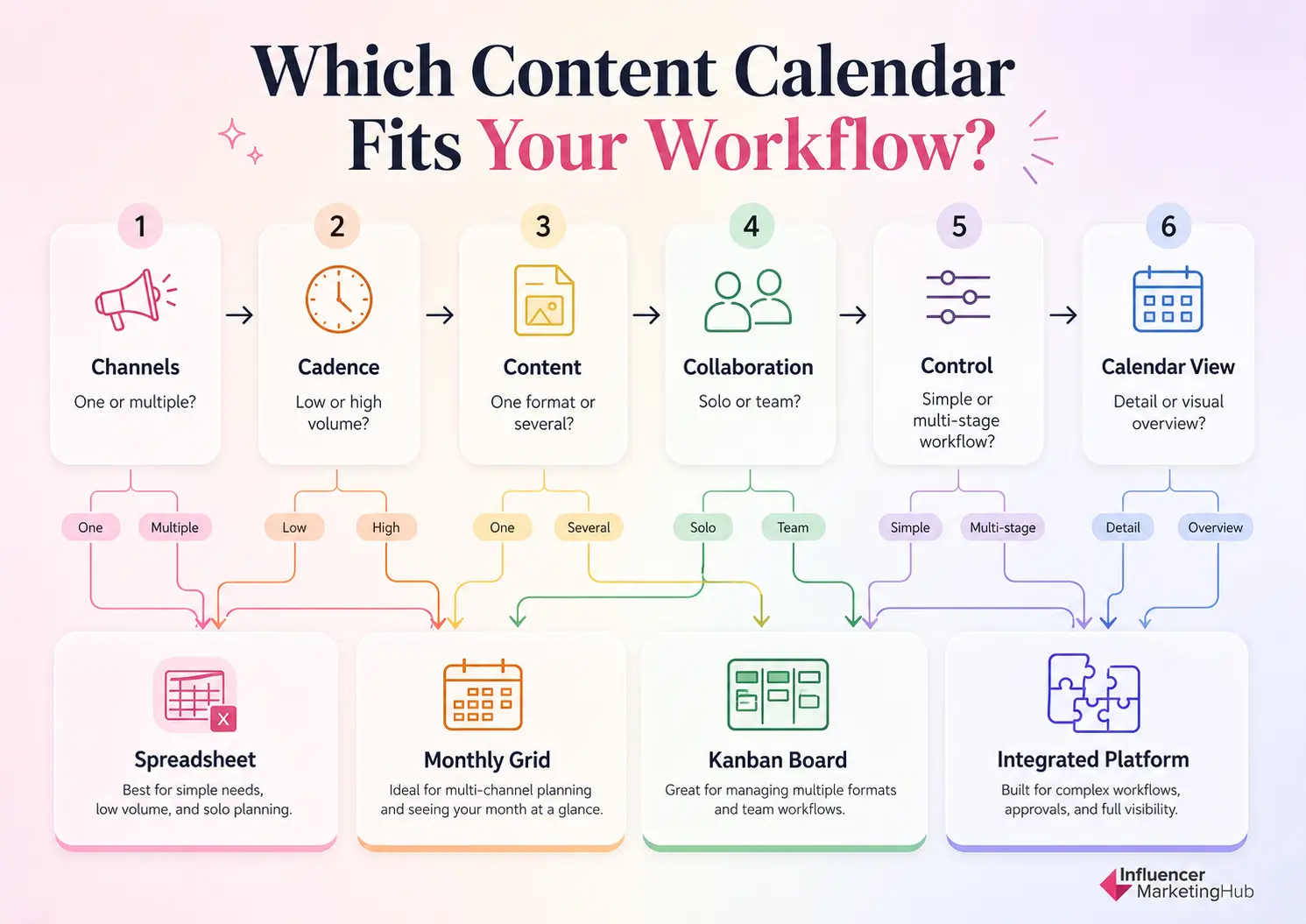
Selecting a calendar should start with your workflow.
The IMH Content Calendar Fit Framework evaluates six factors that determine how your calendar should be structured.
| Factor | Question to Ask |
| Channels | Where will the content be published? |
| Cadence | How often does the team publish? |
| Content | Which formats and assets must be planned? |
| Collaboration | Who contributes, reviews, and approves the work? |
| Control | Which deadlines, stages, and dependencies must be tracked? |
| Calendar View | Which layout makes the workflow easiest to understand? |
1. Channels
Start by identifying where your content will appear.
A calendar built exclusively for a blog can focus on topics, keywords, authors, and publication dates. A multi-channel calendar may need to account for social posts, articles, emails, videos, landing pages, and paid campaigns.
The more channels you manage, the more important campaign labels and master views become.
2. Cadence
Your publishing frequency affects how much detail the calendar needs.
A team publishing two articles per week may work effectively from a monthly spreadsheet. A social media team publishing several times per day will usually need a more detailed weekly or daily view.
Your calendar should make the workload visible without becoming crowded.
3. Content
Consider the range of formats your team produces.
These might include:
- Blog articles
- Social posts
- Short-form videos
- Podcasts
- Newsletters
- Webinars
- Case studies
- Reports
- Downloadable resources
- Paid advertisements
Different formats require different production timelines, contributors, and approval processes. Recording the content format helps your team anticipate those requirements.
4. Collaboration
A calendar for one person can remain simple. A collaborative calendar needs clearer ownership and handoffs.
As more people become involved, you may need to track:
- Strategist
- Writer
- Designer
- Video editor
- Subject-matter expert
- Reviewer
- Approver
- Publisher
Assigning one accountable owner to each item prevents content from becoming stalled between team members.
5. Control
Determine what must happen before a piece of content can be published.
A simple workflow might include:
Planned → Drafting → Review → Published
A more complex operation might require:
Idea → Approved → Briefed → Drafting → Design → Editing → Legal Review → Scheduled → Published
Your calendar should provide enough control to manage production without adding stages your team does not need.
6. Calendar View
Finally, choose the view that makes the plan easiest to understand.
- Spreadsheet: Best for detailed fields, filtering, and customization.
- Monthly grid: Best for visualizing publishing balance and campaign timing.
- Weekly schedule: Best for high-volume, day-to-day execution.
- Kanban board: Best for tracking content through production stages.
- Annual roadmap: Best for major themes, events, and strategic initiatives.
- Integrated platform: Best for publishing, approvals, and analytics in one system.
The goal is to choose a calendar that is detailed enough to support the workflow but simple enough that the team will maintain it consistently.
Framework outcome: A content calendar structure aligned with your channels, publishing cadence, content formats, team, production process, and preferred planning view.
Use the following examples as a starting point.
| Team or Situation | Recommended Calendar |
| Solo blogger publishing weekly | Editorial spreadsheet |
| Creator managing several social platforms | Social media calendar |
| Small marketing team running monthly campaigns | Multi-channel monthly calendar |
| SEO team producing long-form content | Editorial calendar |
| Social team publishing daily | Weekly social calendar |
| Agency managing several client workflows | Separate client calendars plus master view |
| Large editorial department | Editorial spreadsheet plus Kanban board |
| Product launch team | Launch timeline plus production board |
| Publisher planning recurring features | Annual editorial roadmap |
| Integrated marketing department | Master campaign calendar with channel-specific views |
Benefits of Using A Content Calendar
Content calendars act as a roadmap, guiding you in executing your content strategy. By providing a timetable for when content must be published, it ensures your content is on track to achieve your marketing goals.
Here are several advantages of faithfully using a content calendar:
Strategically-Planned Content
Content calendars will help you tell a progressive story that’s consistent with your brand narrative. It helps you come up with ideas that are coherent and align with overall strategic goals. Brands that use content calendars to plan content see a 40% engagement increase as opposed to brands that post sporadically.
A content calendar also helps you avoid creating content that doesn’t contribute to your goals or veers away from your brand positioning.
By using a content calendar as a planning tool, you can consistently create diverse types of engaging content, since you have a bigger picture of the month’s upcoming strategy. It’s also easier to generate ideas and keep them organized, ensuring everything is accounted for and you don’t miss a crucial piece of content.
Schedule Content in Advance
Publishing content consistently is one of the requirements for a successful content strategy. Content calendars help you schedule content in advance and let you avoid the pressure and stress of coming up with content on the fly. The use of content calendars among modern businesses is widespread and has increased from 85% in 2025 to 92% in 2026.
You’ll also avoid missed opportunities when you forget to publish a post due to other commitments.
Likewise, scheduling content helps you focus on other marketing strategies and improve efficiency and productivity.
Create Diverse Content
One of the challenges of content marketing is coming up with a variety of content that will engage the audience. Avoid sticking to just one platform, as the majority of users are active on 6.7 social platforms on average.
Therefore, it’s best if you can mix and match social media posts, blog posts, podcasts, videos, etc. You should also have a balanced content strategy mixing informative, educational, and entertaining content.
Creating a content calendar helps you plot your monthly or quarterly content strategy so you know when specific content types are needed. This helps you prepare for them in advance and ensure you always have diverse content that appeals to different groups of audiences.
Synchronized Marketing Team
Launching successful content strategies is a team effort that requires the input of a strategist, designer, videographer, photographer, editor, social media manager, publisher, and more. It can be difficult to synchronize the work of everyone in the team without a content calendar.
By creating one, you can align everyone’s schedule so they can produce the final output in time for publishing. This is crucial for major and time-sensitive campaigns that have a lot of moving parts.
Social Media Content Calendar Example
A social media content calendar helps teams coordinate what they will publish across platforms, when each post will go live, and how every piece supports a campaign or business objective.
This format is most useful when you manage several social networks, publish frequently, or collaborate with writers, designers, video editors, and approvers.
A strong social media calendar should make both the publishing schedule and the production workflow visible.
What to Include in a Social Media Content Calendar
At minimum, track:
- Publishing date and time
- Social platform
- Campaign or content pillar
- Post format
- Post copy
- Creative asset
- Call to action
- Assigned owner
- Approval status
- Publishing status
- Performance notes
The fields should be consistent enough to make planning easier while still accounting for differences between platforms.
For example, a LinkedIn document post may require a different production process than an Instagram Reel, even when both support the same campaign.
Social Media Content Calendar Example
| Publish Date | Platform | Content | Format | Goal | Owner | Status |
| July 22 | Social media audit framework | Carousel | Drive article traffic | Social team | Scheduled | |
| July 23 | Audit checklist | Reel | Increase engagement | Video team | In review | |
| July 24 | Free audit template promotion | Link post | Generate downloads | Social team | Drafting | |
| July 25 | TikTok | Three audit mistakes | Short-form video | Build awareness | Creator team | Planned |
| July 26 | X | Audit framework summary | Thread | Drive discussion | Content team | Approved |
This example gives the team a clear view of what is being published while connecting every post to a goal.
A more advanced version might also include:
- Target audience
- Paid or organic designation
- UTM link
- Asset dimensions
- Campaign code
- Repurposed source content
- Approval deadline
- Actual performance
When This Calendar Works Best
A social media content calendar is particularly useful for:
- Multi-platform social teams
- Agencies managing several client accounts
- Brands running recurring campaigns
- Teams repurposing one asset across multiple channels
- Marketers publishing daily or several times per week
- Organizations coordinating organic and paid social content
The calendar can be structured as a monthly overview, a detailed weekly schedule, or a spreadsheet with filterable platform views.
Free Social Media Calendar Template
The IMH Social Media Calendar Template provides a ready-made Google Sheets structure for organizing platforms, publishing dates, post formats, content themes, copy, assets, ownership, and status updates.
Use it as a starting point, then remove any fields your team will not update consistently.
📅 Build a More Complete Social Media Planning System A publishing calendar works best when it is connected to the rest of your strategy. Use these IMH resources to plan what to publish, when to publish it, and how each post supports your broader goals:
2. Blog Editorial Calendar Example
A blog editorial calendar manages content from initial idea through publication and, ideally, future optimization.
Unlike a basic publishing schedule, it should account for the work required before an article goes live. That often includes keyword research, briefing, writing, editing, design, approval, uploading, and internal linking.
This makes editorial calendars especially valuable for SEO teams, publishers, content agencies, and brands producing long-form resources.
What to Include in an Editorial Calendar
A practical editorial calendar may include:
- Working title
- Target keyword
- Search intent
- Content type
- Funnel stage
- Author
- Editor
- Brief deadline
- Draft deadline
- Publication date
- Workflow status
- Draft link
- Published URL
- Internal links
- Refresh date
- Performance notes
The specific fields depend on whether the calendar is used primarily for publication planning or for managing the entire editorial workflow.
Blog Editorial Calendar Example
| Topic | Target Keyword | Author | Draft Due | Publish Date | Status |
| How to Perform a Social Media Audit | social media audit | Writer A | July 20 | July 29 | Editing |
| Content Calendar Examples | content calendar examples | Writer B | July 24 | August 2 | Drafting |
| Social Media Budget Guide | social media budget | Writer C | July 27 | August 6 | Brief approved |
| Best Time to Post on LinkedIn | best time to post on LinkedIn | Writer D | July 30 | August 9 | Researching |
| Content Map Templates | content map templates | Writer E | August 2 | August 13 | Planned |
This structure makes deadlines and ownership visible while keeping the calendar connected to SEO priorities.
A more advanced editorial calendar could also track:
- Primary and secondary keywords
- SERP analysis status
- Search volume
- Content cluster
- Subject-matter expert
- Design requirements
- CTA placement
- Schema requirements
- Update frequency
- Traffic and conversion performance
When This Calendar Works Best
A blog editorial calendar is best suited to:
- SEO content teams
- Publishers
- Content marketing agencies
- In-house editorial departments
- Newsletter teams
- Resource centers
- Brands managing evergreen content libraries
It can also support podcasts, webinars, reports, and other long-form formats when the workflow resembles editorial production.
Free Editorial Calendar Template
The IMH Editorial Calendar Template provides a collaborative Google Sheets structure for planning topics, keywords, owners, deadlines, production stages, and publication dates.
It can be used as a straightforward publishing calendar or expanded into a complete editorial workflow.
🧱 Strengthen Your Editorial Planning An editorial calendar tells your team when content will be produced. These supporting resources can help determine what to create and how each piece fits into the wider strategy:
Social Media Calendar vs. Editorial Calendar
Both calendars organize content, but they solve different planning problems.
| Area | Social Media Calendar | Editorial Calendar |
| Primary focus | Post-level publishing | Long-form content production |
| Typical channels | Instagram, TikTok, LinkedIn, Facebook, X, Pinterest | Blog, resource center, newsletter, publication |
| Common content fields | Copy, format, asset, platform, publishing time | Topic, keyword, author, editor, deadlines |
| Typical cadence | Daily or several times per week | Weekly or several times per month |
| Main workflow concern | Coordinating posts and creative assets | Moving content through research, writing, and review |
| Performance fields | Reach, engagement, clicks, conversions | Rankings, traffic, leads, links, conversions |
| Best template | IMH Social Media Calendar | IMH Editorial Calendar |
Some organizations need both.
For example, an editorial team may use its calendar to plan a new guide. Once the guide is approved for publication, the social team can add supporting carousels, videos, threads, and promotional posts to its own calendar.
The two calendars should connect through shared campaign names, content IDs, or source URLs. This creates a clear path from original content production to distribution.
3. Multi-Channel Marketing Calendar Example
A multi-channel marketing calendar brings all campaign activity into one central view.
Instead of planning blog posts, social content, email campaigns, paid media, videos, events, and landing pages in separate documents, the calendar connects them around shared goals, timelines, and campaign milestones.
This format is especially useful when several teams contribute to the same initiative. It helps prevent duplicated work, conflicting messages, and gaps between campaign planning and execution.
What to Include in a Multi-Channel Marketing Calendar
A practical multi-channel calendar should track:
- Campaign name
- Marketing objective
- Target audience
- Channel
- Content format
- Content owner
- Production deadline
- Publish or launch date
- CTA
- Landing page
- Campaign status
- Supporting assets
- Performance notes
The most important field is often the campaign name or campaign ID. It creates a shared reference point across every channel and makes related content easier to group, filter, and evaluate.
Multi-Channel Marketing Calendar Example
| Date | Campaign | Channel | Content | Goal | Owner | Status |
| August 3 | Social Media Audit Toolkit | Blog | Audit guide | Organic traffic | Editorial team | Scheduled |
| August 4 | Social Media Audit Toolkit | Template launch email | Downloads | Email team | Drafting | |
| August 5 | Social Media Audit Toolkit | Framework carousel | Article traffic | Social team | In design | |
| August 6 | Social Media Audit Toolkit | YouTube | Audit walkthrough | Education | Video team | Recording |
| August 7 | Social Media Audit Toolkit | Paid social | Template promotion ad | Lead generation | Paid media team | Planned |
Each item supports the same campaign while serving a different role.
The blog article attracts search traffic. The email introduces the resource to an existing audience. Social posts expand distribution. Video explains the framework. Paid media extends reach and generates additional downloads.
When This Calendar Works Best
A multi-channel marketing calendar is best suited to:
- Integrated marketing teams
- Agencies coordinating several services
- Brands running recurring campaigns
- Teams supporting product launches
- Organizations combining organic and paid distribution
- Businesses managing content across several departments
It is particularly valuable when campaign assets share dependencies.
For example, social posts and emails may depend on a landing page being completed first. Recording those relationships helps teams sequence work more realistically.
4. Email Marketing Calendar Example
An email marketing calendar helps teams plan newsletters, promotional campaigns, automated sequences, product announcements, and audience-specific communications.
Although an email may only take a few minutes to send, the work behind it can involve audience segmentation, copywriting, design, approvals, testing, landing pages, and coordination with other marketing channels.
A calendar makes those dependencies visible before they become last-minute problems.
What to Include in an Email Marketing Calendar
Useful fields include:
- Campaign name
- Email type
- Audience segment
- Subject line
- Primary message
- CTA
- Send date and time
- Owner
- Design status
- Approval status
- Testing status
- Landing page
- Automation or sequence
- Performance results
For recurring newsletters, you may also track content sections, sponsor placements, contributors, and editorial deadlines.
Email Marketing Calendar Example
| Send Date | Audience | Objective | CTA | Owner | Status | |
| August 5 | Monthly industry newsletter | Full subscriber list | Engagement | Read the issue | Newsletter team | Scheduled |
| August 8 | Audit template launch | Social media marketers | Downloads | Get the template | Email team | In review |
| August 11 | Webinar invitation | Agency subscribers | Registrations | Reserve a seat | Events team | Drafting |
| August 14 | Product update | Active customers | Adoption | Explore new feature | Lifecycle team | Planned |
| August 18 | Re-engagement email | Inactive subscribers | Reactivation | Update preferences | CRM team | Planned |
This view helps prevent campaigns from competing for attention or overwhelming the same audience segment within a short period.
When This Calendar Works Best
An email marketing calendar is useful for:
- Newsletter teams
- Lifecycle marketers
- Ecommerce brands
- B2B demand-generation teams
- Membership organizations
- Event marketers
- Businesses running automated sequences
A spreadsheet usually works well for modest email volume. Teams managing complex automation, segmentation, and behavioral triggers may need to pair it with their email platform’s workflow tools.
5. Campaign Content Calendar Example
A campaign content calendar organizes every asset supporting a specific marketing initiative.
Unlike an ongoing content calendar, which covers regular publishing activity, a campaign calendar is built around a defined objective, audience, timeline, and desired outcome.
It gives teams a complete view of how the campaign will unfold from its earliest teaser through launch, promotion, conversion, and follow-up.
Structure the Calendar Around Campaign Phases
A useful campaign calendar can be divided into five stages:
- Tease – Build curiosity before the main announcement.
- Launch – Introduce the campaign, resource, offer, or event.
- Sustain – Maintain visibility with educational and supporting content.
- Convert – Reinforce the CTA and address barriers to action.
- Recap – Share results, lessons, highlights, or follow-up resources.
This structure helps teams avoid placing all their effort into launch day while neglecting the content needed before and after it.
Campaign Content Calendar Example
| Phase | Date | Channel | Asset | Purpose | Owner | Status |
| Tease | September 2 | Problem-focused poll | Build curiosity | Social team | Scheduled | |
| Tease | September 4 | Early-access announcement | Generate interest | Email team | Drafting | |
| Launch | September 8 | Blog | Campaign landing article | Explain the offer | Editorial team | In review |
| Launch | September 8 | Social | Launch video | Expand reach | Video team | Editing |
| Sustain | September 11 | Educational follow-up | Address use cases | Email team | Planned | |
| Convert | September 15 | Paid social | Testimonial ad | Drive action | Paid team | Planned |
| Recap | September 22 | Blog | Results and lessons | Extend campaign value | Editorial team | Planned |
This gives every team a shared understanding of the campaign sequence and the purpose of each asset.
When This Calendar Works Best
Campaign calendars work well for:
- Seasonal promotions
- Lead magnet launches
- Events and webinars
- Research reports
- Branded content initiatives
- Influencer campaigns
- Awareness campaigns
- Recruitment campaigns
- Limited-time offers
They are also useful for agencies that need to show clients how content will build momentum across a defined campaign period.
6. Weekly Content Calendar Example
A weekly content calendar gives teams a detailed view of what must be published and completed over the next several days.
This format is especially useful for fast-moving teams that publish frequently, manage several platforms, or need close visibility into daily execution. While monthly calendars provide strategic context, weekly calendars make it easier to coordinate exact publishing times, asset requirements, owners, and final approvals.
What to Include in a Weekly Content Calendar
Useful fields include:
- Day and date
- Publishing time
- Channel
- Content topic
- Format
- Campaign
- Owner
- Asset link
- Approval status
- Publishing status
- Notes
For high-volume teams, it may also be helpful to track audience segment, region, account, or paid versus organic distribution.
Weekly Content Calendar Example
| Day | Time | Channel | Content | Format | Owner | Status |
| Monday | 9:00 AM | Content calendar framework | Carousel | Social team | Scheduled | |
| Tuesday | 12:00 PM | Planning mistakes | Reel | Video team | In review | |
| Wednesday | 10:00 AM | Blog | Content calendar examples guide | Article | Editorial team | Scheduled |
| Thursday | 2:00 PM | Free template promotion | Newsletter | Email team | Drafting | |
| Friday | 11:00 AM | TikTok | Weekly planning workflow | Short video | Creator team | Planned |
This type of view helps teams spot overloaded days, missing assets, and approval bottlenecks before they affect the publishing schedule.
When This Calendar Works Best
A weekly content calendar is a strong fit for:
- Social media teams
- Newsrooms
- Newsletter publishers
- Agencies managing client content
- Teams producing daily video
- Fast-moving campaign environments
- Businesses responding to current events or trends
It also works well as a tactical layer beneath a broader monthly or quarterly calendar.
7. Monthly Content Calendar Example
A monthly content calendar provides a visual overview of what is planned across several weeks.
This format is ideal for reviewing publishing balance, campaign timing, content themes, and important dates. It allows teams to see whether the calendar is overloaded, whether certain channels are being neglected, and how different initiatives overlap.
What to Include in a Monthly Content Calendar
A monthly view usually contains less detail than a spreadsheet.
Each calendar entry might include:
- Content title or short description
- Channel
- Format
- Campaign
- Owner
- Status
- Publishing time
Color coding can help distinguish channels, campaigns, or content formats, but the system should remain simple enough that every team member understands it.
Monthly Content Calendar Example
| Week | Monday | Tuesday | Wednesday | Thursday | Friday |
| Week 1 | Blog: Audit Guide | LinkedIn Carousel | Email Newsletter | Instagram Reel | Facebook Template Post |
| Week 2 | TikTok Tutorial | Blog: Budget Guide | LinkedIn Poll | Webinar Email | YouTube Walkthrough |
| Week 3 | Campaign Teaser | Instagram Carousel | Launch Article | Launch Email | Paid Social Ad |
| Week 4 | Case Study | LinkedIn Video | Newsletter Recap | TikTok Tips | Monthly Report |
The monthly view makes it easy to evaluate content balance at a glance.
For example, a team may notice that:
- Too much promotional content is concentrated in one week.
- Several channels go unused for long periods.
- Similar formats are scheduled on consecutive days.
- Major campaigns overlap unnecessarily.
- Production-heavy assets are clustered too closely together.
When This Calendar Works Best
Monthly calendars work well for:
- Small and medium-sized marketing teams
- Social media planning
- Newsletter schedules
- Campaign coordination
- Event promotion
- Seasonal content
- Executive visibility
- Cross-functional planning
They are particularly useful for stakeholders who need to understand the plan without reviewing detailed task-level information.
8. Kanban Content Calendar Example
A Kanban content calendar organizes work according to production stage rather than publication date alone.
Each piece of content is represented by a card that moves through a series of columns as work progresses. This makes it easy to identify bottlenecks, stalled assignments, and the overall volume of content in production.
A typical workflow might look like:
Ideas → Approved → Briefing → Production → Review → Scheduled → Published
What to Include on Each Kanban Card
Each card may contain:
- Content title
- Content type
- Campaign
- Owner
- Due date
- Publish date
- Checklist
- Draft link
- Creative assets
- Approval requirements
- Priority
- Notes
Labels can distinguish content formats, channels, campaigns, audiences, or levels of urgency.
Kanban Content Calendar Example
| Ideas | In Production | Review | Scheduled | Published |
| Email calendar guide | Social calendar video | Content calendar article | Audit framework carousel | Budget planning article |
| Q4 campaign themes | Product launch email | Monthly planning infographic | Newsletter issue | Competitor analysis post |
| LinkedIn checklist | Blog refresh project | Webinar landing page | Instagram Reel | Social audit template |
This structure gives teams an immediate view of where work is accumulating.
If ten cards sit in review while only one is moving into scheduling, the problem may be approval capacity rather than content production.
When This Calendar Works Best
Kanban calendars are particularly effective for:
- Collaborative content teams
- Agencies
- Video production
- Editorial workflows
- Campaign production
- Teams with several approval stages
- Organizations managing many simultaneous assets
They work especially well when workflow visibility matters more than seeing every publication date on one grid.
9. Annual Editorial Calendar Example
An annual editorial calendar maps major content priorities across the full year.
Rather than planning every article or post in detail, it creates a strategic roadmap for recurring themes, reports, events, seasonal campaigns, and major publication initiatives.
This format helps teams avoid reactive planning and gives stakeholders time to prepare for resource-intensive content.
What to Include in an Annual Editorial Calendar
An annual roadmap may include:
- Month or quarter
- Strategic theme
- Major campaign
- Tentpole content
- Seasonal event
- Research or report
- Product milestone
- Target audience
- Primary objective
- Responsible team
It should remain high-level. Detailed content production can be planned later in quarterly, monthly, and weekly calendars.
Annual Editorial Calendar Example
| Period | Strategic Theme | Major Content | Supporting Activity | Primary Goal |
| Q1 | Planning and strategy | Annual marketing trends report | Webinar and newsletter series | Awareness |
| Q2 | Creator partnerships | Influencer benchmark study | Social campaign and case studies | Authority |
| Q3 | Social commerce | Social commerce guide | Video series and lead magnet | Lead generation |
| Q4 | Budget and forecasting | Marketing budget report | Templates and planning workshop | Conversions |
This gives teams a clear strategic direction while leaving room to refine topics as each quarter approaches.
When This Calendar Works Best
Annual editorial calendars are valuable for:
- Publishers
- Research organizations
- Large content teams
- Associations
- B2B brands
- Event-driven organizations
- Companies producing recurring reports
- Teams managing seasonal campaigns
They also help marketing leaders align staffing, budgets, partnerships, and production resources well before major initiatives begin.
📅 Start With the View Your Team Actually Needs You do not need to build every calendar at once. Start with the format that solves your most immediate planning problem: Then add supporting views only when they provide a clear operational benefit.
Build a Content Calendar That Supports the Work
The best content calendar is not the one with the most fields, automations, or visual views. It is the one that gives your team enough structure to plan strategically, coordinate production, and publish consistently.
Use the examples in this guide to identify the format that best reflects your channels, cadence, content types, team, and approval process. Then customize only the fields your contributors will actively maintain.
As your content operation grows, you can add new views, workflows, and tools without rebuilding the planning system from scratch.
Start with the IMH Social Media Calendar Template or IMH Editorial Calendar Template, test it with one real month, and refine it around the way your team actually works.
Frequently Asked Questions
What is an example of a content calendar?
A content calendar might be a Google Sheet listing each planned item’s topic, channel, format, owner, due date, publication date, and status. More advanced versions can also track campaigns, keywords, approvals, assets, and performance.
What should a content calendar include?
Most content calendars should include the content title, channel, format, owner, production deadline, publication date, status, and links to drafts or assets. Teams can also add fields for campaigns, keywords, audiences, goals, and results.
How do you create a content calendar in Google Sheets?
Create columns for the information your team needs to track, add standardized status options, assign owners, and enter publication dates. You can then use filters, dropdown menus, conditional formatting, and separate tabs to organize different channels or views.
What is the difference between a content calendar and an editorial calendar?
A content calendar may coordinate content across several channels, including social media, email, video, and blogs. An editorial calendar typically focuses on articles or other long-form content and tracks topics, keywords, writers, editors, production deadlines, and publication dates.
Which content calendar format is best?
The best format depends on your workflow. Spreadsheets work well for detailed planning, monthly grids for visual coordination, weekly calendars for execution, Kanban boards for production tracking, and annual roadmaps for long-term themes.
How far ahead should you plan a content calendar?
Plan major themes and campaigns several months ahead, define specific topics and formats approximately one month ahead, and finalize assets and approvals one or two weeks before publication. Leave room for timely or unexpected content.
How often should you update a content calendar?
Update statuses and deadlines whenever work changes, review upcoming deliverables weekly, confirm publishing plans monthly, and reassess strategic priorities each quarter.